Converting a PDF to Word used to be painful — garbled text, broken layouts, and lost formatting. Today's best tools preserve tables, fonts, and structure with impressive accuracy. Here's our breakdown of the top 10 PDF converters for 2026, from free online tools to professional-grade desktop software.
Our Top 10 Picks
Adobe Acrobat Online
Best for All-in-One PDF Conversion
Convert PDF to Word, Excel, PowerPoint, JPEG, and more
Industry-leading OCR for scanned document conversion
Trusted by enterprises worldwide
Cloud storage syncs with Adobe Document Cloud
Mobile app available on iOS and Android
Smallpdf
Best for Everyday PDF Conversion Online
25+ PDF tools in one platform
Convert PDF to Word, Excel, PPT, JPG, and HTML
SSL encrypted file transfers
Works on Windows, Mac, and mobile
Chrome extension for in-browser conversion
ILovePDF
Best Free Online Batch PDF Converter
Convert, merge, split, compress, and edit PDFs
Batch processing — upload multiple files at once
No watermarks on free plan for most tools
REST API for developers
Available as installable desktop app
Soda PDF
Best Desktop + Cloud Hybrid PDF Converter
Desktop and online versions available
PDF to Word, Excel, PowerPoint, HTML, and image formats
E-signature tools included
Batch conversion supported
Optical character recognition (OCR) included
PDF2Doc
Best for Free PDF to Word Conversion
Up to 20 PDF to Word or Excel conversions at once
No registration required
Simple drag-and-drop or file URL upload
Preserves formatting for most standard PDFs
Quick turnaround for batch files
Sejda PDF
Best for Privacy-Focused PDF Conversion
Files automatically deleted after 2 hours
PDF to Word, Excel, JPEG, HTML, and more
Desktop app available — no internet needed
Works with protected PDFs
Minimal and distraction-free interface
PDF Candy
Best for Comprehensive Free PDF Toolkit
40+ free PDF tools under one roof
Convert PDF to and from 20+ formats
OCR text recognition available
Batch mode for multiple files
Desktop app for offline processing
Nitro PDF
Best Business-Grade PDF Converter
Microsoft Office-grade PDF to Word/Excel accuracy
Batch conversion for enterprise document workflows
eSign and fillable form features
Google Drive, Dropbox, and OneDrive integrations
GDPR and SOC 2 compliant
CleverPDF
Best for Desktop-Based PDF Conversion
40+ PDF tools for desktop and web
Convert PDF to Word, PPT, Excel, images, and more
Offline desktop app — no internet upload needed
OCR for scanned PDFs
One-time license — no subscription required
PDF.co
Best Developer API for PDF Conversion
Powerful REST API for automated PDF workflows
Convert, parse, generate, and OCR PDFs via API
Integrates with Zapier, Make, and 1,500+ apps
Extracts structured data from invoices and forms
SOC2 and GDPR compliant cloud infrastructure
How to Choose
For occasional personal conversions, Smallpdf, ILovePDF, or the free tier of Sejda are all excellent free choices. For businesses converting large volumes of contracts or invoices, a tool like Adobe Acrobat or Nitro PDF with OCR and batch processing is worth the subscription. Developers building automated document pipelines should look at PDF.co's API.
Recommended for You
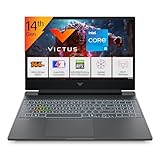
Gaming Laptop Pro
RTX 4050 · AMD Ryzen 7 · RGB Keyboard
- RTX 4050 GPU
- AMD Ryzen 7 processor
- RGB mechanical keys
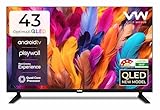
VW 43" Smart QLED TV
Full HD · Android TV · QLED Display
- QLED vivid colors
- Android TV built-in
- 43" Full HD panel
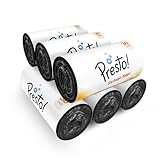
Presto! Garbage Bags (180 Count)
Medium · 30 Bags × 6 Rolls · 19×21"
- 180 bags value pack
- Medium 19×21" size
- Leak-proof design
Disclosure: As an Amazon Associate, we may earn from qualifying purchases. Prices may vary.
Disclaimer: This article contains affiliate links. We may earn a commission if you sign up through our links. This does not influence our editorial recommendations.